The Fundamentals: Hypertext Transfer Protocol
Building an HTTP server from scratch is one of those enlightening “wizard” moments in a developer’s journey. It demystifies the magic behind fetch('google.com') and turns the abstract concept of “The Web” into concrete bytes and sockets.
This project, HTTP from TCP, is a Python implementation of a concurrent HTTP/1.1 server. It implements the core of the HTTP/1.1 protocol (RFC 9112) directly on top of TCP, handling everything from parsing raw bytes to managing concurrent connections and chunked transfer encoding.
1. Transmission Control Protocol
At its core, HTTP/1.1 is a text-based protocol that relies entirely on a reliable transport layer. While this is slowly changing (see QUIC), HTTP/1.1 and HTTP/2 are built firmly on top of TCP (Transmission Control Protocol).
TCP, defined in RFC 793, is often called the “certified mail” of the Internet. It ensures reliability through a few clever mechanisms:
- Sequence Numbers: Every byte of data sent is assigned a unique number. If packets arrive out of order, the receiver uses these numbers to reassemble them correctly.
- Acknowledgments (
ACK): When the receiver gets data, it replies with anACKpacket saying, “I received everything up to byte X, please send byte X+1.” - Retransmission: If the sender doesn’t receive an
ACKwithin a certain timeframe, it assumes the packet was lost and automatically resends it.
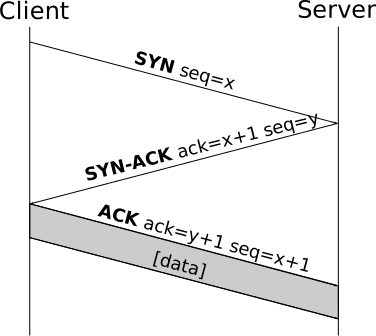
Transmission Control Protocol vs. User Datagram Protocol
To understand why HTTP uses TCP, we have to look at its alternative: UDP (User Datagram Protocol).
UDP is the “fire and forget” protocol.
It throws packets at the destination without caring if the other side is listening, if they arrive at the destination, if they arrive in order, or if they are duplicates.
It is lightweight and fast, making it ideal for real-time applications like VOIP or gaming.
Both UDP and TCP are transport-layer protocols.
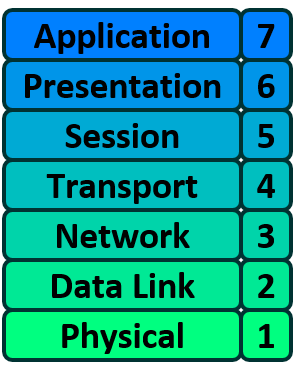
Why HTTP needs TCP
For a text-based protocol like HTTP/1.1, ordering and data integrity are non-negotiable.
Imagine downloading a JavaScript file via UDP. If packets arrive out of order, your function definitions might appear after they are called. If a packet is lost, a syntax error crashes your entire site. If a packet is duplicated, your bank transfer happens twice.
TCP guarantees that the application layer (our HTTP server) receives a perfect, linear stream of bytes. It abstracts away the chaos of the internet, allowing us to simply “read” and “write” data without worrying about network packet loss.
Listening for Connections
In this project, we handle these low-level socket operations using Python’s asyncio. The Server class initiates the listener using asyncio.start_server.
# tcp_to_http/server.py

async def __run_async(self) -> None:
    # This creates a TCP server socket
    server = await asyncio.start_server(
        self.__handle_connection, self.host, self.port
    )
    logger.info(f"Server running on {self.host}:{self.port}")

    # ... signal handling ...

    await server.serve_forever()
When a client connects, the OS completes the handshake, and asyncio hands us a reader and writer representing that established, reliable connection.
2. The protocol
HTTP/1.1 is a text-based protocol (and for a computer, text is just a bunch of bytes). This is good for us because it means that if an HTTP request or response is too big to fit into a single TCP packet, it can be broken up into many packets and later reconstructed at the destination. Because HTTP/1.1 runs over TCP, we can be assured the data will arrive in complete and ordered form, as discussed above.
Messages and Message format
Let’s get directly into it by looking at section 2 and section 2.1 in RFC 9112
Section 2 states the following: “HTTP/1.1 clients and servers communicate by sending messages.”
Section 2.1 continues: “An HTTP/1.1 message consists of a start-line followed by a CRLF and a sequence of octets in a format similar to the Internet Message Format [RFC5322]: zero or more header field lines (collectively referred to as the “headers” or the “header section”), an empty line indicating the end of the header section, and an optional message body.”
HTTP-message   = start-line CRLF
                 *( field-line CRLF )
                 CRLF
                 [ message-body ]
It then continues: “A message can be either a request from client to server or a response from server to client. Syntactically, the two types of messages differ only in the start-line, which is either a request-line (for requests) or a status-line (for responses), and in the algorithm for determining the length of the message body (Section 6).”
start-line = request-line / status-line
A couple of things we should note from here:
CRLFis a more “Windows” style new line - Written out, it looks like\r\n*( field-line CRLF )denotes zero or more header lines- Syntactically, a request and a response message differ only in the start-line
Let’s look at a POST request. We will denote comments that are not a part of the request with #
POST /post HTTP/1.1                        # This is the request line
host: httpbin.org                          # These are header or 'field-lines'
user-agent: curl/8.2.1
accept: application/json
content-type: application/x-www-form-urlencoded
content-length: 15
                                           # Note the extra \r\n after the end of headers
{data: "Hello"}                            # Message body - The data we want to transmit
Parsing the Request
To handle this structure robustly in our server, we can’t just read() everything at once. We might receive a partial request or multiple requests back-to-back.
We use a state machine in our Request class to track exactly which part of the message we are currently reading:
# tcp_to_http/request.py

class ParserState(Enum):
    INITIALIZED = auto()      # Waiting for the Start-Line
    PARSING_HEADERS = auto()  # Reading headers
    PARSING_BODY = auto()     # Reading body (if Content-Length > 0)
    DONE = auto()             # Request complete
The parser reads from the incoming byte stream and transitions through these states.
The Request Line
The first thing we parse is the Request-Line (RFC 9112 Section 3).
It has a very specific format:
request-line = method SP request-target SP HTTP-version CRLF
For example: GET /index.html HTTP/1.1
In Python, we parse this by looking for the first CRLF (the end of the line) and then splitting by spaces:
@dataclass
class RequestLine:
    method: str
    request_target: str
    http_version: str

    def __init__(self, data_string: str) -> None:
        parts = data_string.split(" ")
        if len(parts) != 3:
            raise ValueError(f"poorly formatted request-line: {data_string}")

        self.method = parts[0]       # e.g., "GET"
        self.request_target = parts[1] # e.g., "/index.html"
        self.http_version = parts[2]   # e.g., "HTTP/1.1"

        # ... additional validation (e.g., checking standard HTTP verbs) ...
Parsing the Headers
Again, let’s look at what the RFCs have to say. We’ll start with RFC 9112 Section 5.
It states: “Each field line consists of a case-insensitive field name followed by a colon (”:"), optional leading whitespace, the field line value, and optional trailing whitespace."
field-line = field-name ":" OWS field-value OWS
While we won’t list every rule here, the most important ones are:
- There can be leading and trailing optional whitespace (OWS) in the field value.
- The field names (keys) are case insensitive.
- The field names can only contain specific characters:
token = 1*tchar tchar = "!" / "#" / "$" / "%" / "&" / "'" / "*" / "+" / "-" / "." / "^" / "_" / "`" / "|" / "~" / DIGIT / ALPHA - A single field name can appear multiple times (e.g.,
Set-Cookie).
To handle this, we create a Headers class that behaves like a dictionary but handles these rules automatically:
class Headers(dict):
    def __setitem__(self, key: str, value: str) -> None:
        # Enforce case-insensitivity
        super().__setitem__(key.lower(), value)

    def parse(self, data: bytes) -> tuple[int, bool]:
        # Logic to parse "Key: Value" lines
        idx = data.find(CRLF)
        if idx == 0:
            return idx + len(CRLF), True # Empty line means headers are done

        line = data[:idx].decode("utf-8").strip()
        key, value = line.split(":", 1)
        self[key.strip()] = value.strip()

        return idx + len(CRLF), False
Parsing the Body
After the headers, we encounter the message body. The parser knows it has reached the body when it finds an empty line (a double CRLF) immediately after the headers.
RFC 9112 Section 6 describes the message body as: “The message body (if any) of an HTTP/1.1 message is used to carry content […] for the request or response.”
message-body = *OCTET
The challenge is determining how long the body is. In TCP, the stream just keeps coming; there is no natural “end of message” marker in the data itself.
To solve this, we check the headers we just parsed. The most common method for determining length is the Content-Length header.
- Content-Length is present: We read exactly that many bytes.
- Content-Length is missing: For requests, this usually means there is no body (length 0).
Note: There is also Transfer-Encoding: chunked, which allows sending data without knowing the total size upfront, but we’ll focus on Content-Length for the basic flow.
Here is how our parser handles the body state:
case ParserState.PARSING_BODY:
    # Check for Content-Length (simplified logic)
    content_length = self.headers.get("Content-Length")

    if not content_length:
        # No body defined -> Request is done
        self.state = ParserState.DONE
        return 0

    content_len = int(content_length)

    # Calculate how many bytes we still need
    remaining = content_len - self.body_length_read

    # Take up to 'remaining' bytes from the current data chunk
    chunk = data[:remaining]

    self.body.extend(chunk)
    self.body_length_read += len(chunk)

    if self.body_length_read >= content_len:
        self.state = ParserState.DONE

    return len(chunk) # Return number of bytes consumed
With this, we are done with requests. We’ve successfully parsed the Start-Line, Field-Lines (headers), and the Message Body.
Forming a response
Once we have processed the request, it is time to talk back to the client.
Writing a response is essentially the reverse of parsing a request. We just need to follow the format defined in RFC 9112 Section 4.
A response message looks like this:
HTTP-response  = status-line CRLF
                 *( field-line CRLF )
                 CRLF
                 [ message-body ]
Notice the similarity? It is identical to the request structure, except that the start-line is now a Status-Line.
To handle this cleanly, we implement a Writer class that wraps the underlying socket. It uses a state machine similar to our parser to ensure we write the response parts in the correct order: Status-Line -> Headers -> Body.
class WriterState(IntEnum):
    STATUS_LINE = auto()
    HEADERS = auto()
    BODY = auto()
The Status Line
The Status-Line tells the client if their request succeeded or failed. Its format is:
status-line = HTTP-version SP status-code SP [ reason-phrase ] CRLF
For example: HTTP/1.1 200 OK or HTTP/1.1 404 Not Found.
In our Writer class, we have a method specifically for this. It takes a StatusCode enum (e.g., StatusCode.OK) and formats the string.
def write_status_line(self, status_code: StatusCode) -> None:
    if self.writer_state != WriterState.STATUS_LINE:
        raise ValueError(f"cannot write status line in state {self.writer_state}")

    # get_status_line returns bytes like b"HTTP/1.1 200 OK\r\n"
    self.writer.write(get_status_line(status_code))

    # Advance state
    self.writer_state = WriterState.HEADERS
Writing Headers
Next, we write the headers. Just like in the request, these are key-value pairs separated by CRLF.
Crucially, we must end the header section with an empty line (an extra CRLF). This tells the client, “The headers are done, what follows is the body.”
def write_headers(self, headers: Headers) -> None:
    if self.writer_state != WriterState.HEADERS:
        raise ValueError(f"cannot write headers in state {self.writer_state}")

    for key, value in headers.items():
        # Write "Key: Value\r\n"
        self.writer.write(f"{key}: {value}\r\n".encode())

    # Write the final empty line to signal end of headers
    self.writer.write(b"\r\n")

    self.writer_state = WriterState.BODY
Writing the Body
Finally, we send the actual content (HTML, JSON, image data, etc.).
If we are not using Chunked Encoding (which we’ll discuss later), we simply encode the data and write it to the socket.
def write_body(self, data: str) -> int:
    if self.writer_state != WriterState.BODY:
        raise ValueError(f"cannot write body in state {self.writer_state}")

    encoded_data = data.encode("utf-8")
    self.writer.write(encoded_data)

    return len(data)
Putting it together
When a user handler uses our Writer, it looks something like this. Note how the order is enforced by our API:
def handler(writer: Writer, request: Request):
    body = "<h1>Hello World</h1>"

    # 1. Status Line
    writer.write_status_line(StatusCode.OK)

    # 2. Headers (must include Content-Length!)
    headers = Headers()
    headers["Content-Type"] = "text/html"
    headers["Content-Length"] = str(len(body))
    writer.write_headers(headers)

    # 3. Body
    writer.write_body(body)
Chunked encoding
Remember how all HTTP servers and clients communicate via messages and how the RFCs define an HTTP message?
Let’s take a quick refresher: we have a start-line/status-line (depending on whether we are talking about a request or a response), zero or more field-lines (headers), followed by an optional message-body.
The message-body definition allows for flexibility. It can be either fixed size (where we must include the Content-Length header) or variable size. For variable content, we use the Transfer-Encoding: chunked header.
Why Chunked Encoding?
Imagine you are generating a large report, compressing a file on the fly, or streaming live events. You don’t know the total size of the content until you are completely finished. If you had to use Content-Length, you would have to buffer the entire response in memory before sending a single byte.
Chunked encoding solves this by allowing us to stream data in pieces (chunks) as soon as they are ready.
The Wire Format
In this mode, the body is split into chunks. Each chunk consists of:
- The size of the data in hexadecimal.
- A
CRLF(\r\n). - The actual data.
- Another
CRLF.
The stream is terminated by a “zero chunk” (size 0) followed by two CRLFs.
HTTP/1.1 200 OK
Content-Type: text/plain
Transfer-Encoding: chunked

7\r\n
Mozilla\r\n
9\r\n
Developer\r\n
7\r\n
Network\r\n
0\r\n
\r\n
Implementing the Writer
In our Writer class, write_chunked_body handles the wrapping of our data into the hex-prefixed format.
def write_chunked_body(self, data: str | bytes) -> int:
    if self.writer_state != WriterState.BODY:
        raise ValueError(f"cannot write body in state {self.writer_state}")

    if isinstance(data, str):
        encoded_data = data.encode("utf-8")
    else:
        encoded_data = data

    # 1. Write size in hex + CRLF
    # e.g., if len is 10, writes b"a\r\n"
    chunk_size = f"{len(encoded_data):x}\r\n".encode()
    self.writer.write(chunk_size)

    # 2. Write actual data
    self.writer.write(encoded_data)

    # 3. Write trailing CRLF
    self.writer.write(b"\r\n")

    return len(encoded_data)

def write_chunked_body_done(self) -> int:
    # Write the zero chunk to signal end of stream
    data = b"0\r\n\r\n"
    self.writer.write(data)
    return len(data)
Trailers
You might have noticed that the zero chunk ends with 0\r\n\r\n. Why the second \r\n?
The chunked transfer coding allows for an optional set of Trailer Fields to be sent after the chunked message body.
RFC 9112 Section 7.1.2 tells us the following: “A trailer section allows the sender to include additional fields at the end of a chunked message in order to supply metadata that might be dynamically generated while the content is sent, such as a message integrity check, digital signature, or post-processing status….”
trailer-section = *( field-line CRLF )
The format is:
- Last Chunk:
0\r\n - Trailer Section: Zero or more field lines (just like headers).
- End of Message:
\r\n
So 0\r\n\r\n is actually the Last Chunk (0\r\n) followed immediately by the End of Message marker (\r\n), implying an empty Trailer Section.
If we wanted to send a checksum (like an MD5 hash) that we could only calculate after streaming the whole file, it would look like this:
HTTP/1.1 200 OK
Transfer-Encoding: chunked
Trailer: Content-MD5

... (chunks) ...
0\r\n
Content-MD5: 79054025255fb1a26e4bc422aef54eb4\r\n
\r\n
This is a powerful feature for streaming data integrity!
Writing Trailers
Our server handles this with a dedicated write_trailers method. It ensures the preceding “zero chunk” (0\r\n) is written first, followed by the trailer fields, and finally the closing \r\n.
def write_trailers(self, trailers: Headers) -> None:
   if self.writer_state != WriterState.BODY:
       msg = f"cannot write headers in state {self.writer_state}"
       raise ValueError(msg)

   # Write the zero chunk
   self.writer.write(b"0\r\n")

   # Write the trailer fields
   for key, value in trailers.items():
       self.writer.write(f"{key}: {value}\r\n".encode())

   # Write the final CRLF to end the message
   self.writer.write(b"\r\n")
Appendices
Security and Encryption (HTTPS)
You might have noticed that none of the RFCs we discussed mention encryption, certificates, or keys. That is because HTTP itself is a plaintext protocol.
Security is typically handled by a lower layer: TLS (Transport Layer Security). When you visit https://google.com, your browser effectively opens a TCP connection, performs a TLS handshake to establish an encrypted tunnel, and then speaks standard HTTP/1.1 (or h2) inside that tunnel.
The HTTP server code doesn’t change much; it just reads/writes from a decrypted stream instead of a raw TCP socket.
HTTP/2 and HTTP/3
While HTTP/1.1 is still everywhere, the web has evolved to address performance limitations:
HTTP/2(RFC 7540): Introduces binary framing and multiplexing. Instead of sending text messages one by one (which leads to Head-of-Line blocking), it breaks messages into binary frames that can be interleaved over a single TCP connection.HTTP/3(RFC 9114): Moves away fromTCPentirely. It runs overQUIC(which sits on top ofUDP). This solves the transport-layer Head-of-Line blocking problem that evenHTTP/2suffers from when packets are lost.
Source Code
You can find the full, working implementation of the server discussed in this article on GitHub.
References
The definitions in this article come from the official RFCs. If you want to dive deeper, here is where to look:
RFC 9112 (HTTP/1.1): The modern standard for the message syntax we built. It is generally easier to read than the older specs and relies onRFC 9110.RFC 9110 (HTTP Semantics): Defines the core concepts (Methods, Status Codes, Headers) independent of the version (1.1, 2, or 3).RFC 7231: An active and widely referenced standard that held the torch for years.RFC 2616: The “classic” RFC from 1999. It is now deprecated and superseded by the 7230/9110 families.
Learning Resources
If you want to build this yourself, check out these courses:
- CodeCrafters: Build your own HTTP server: Less guided approach, more DIY
- Boot.dev: Learn HTTP - A more guided approach with explanations